
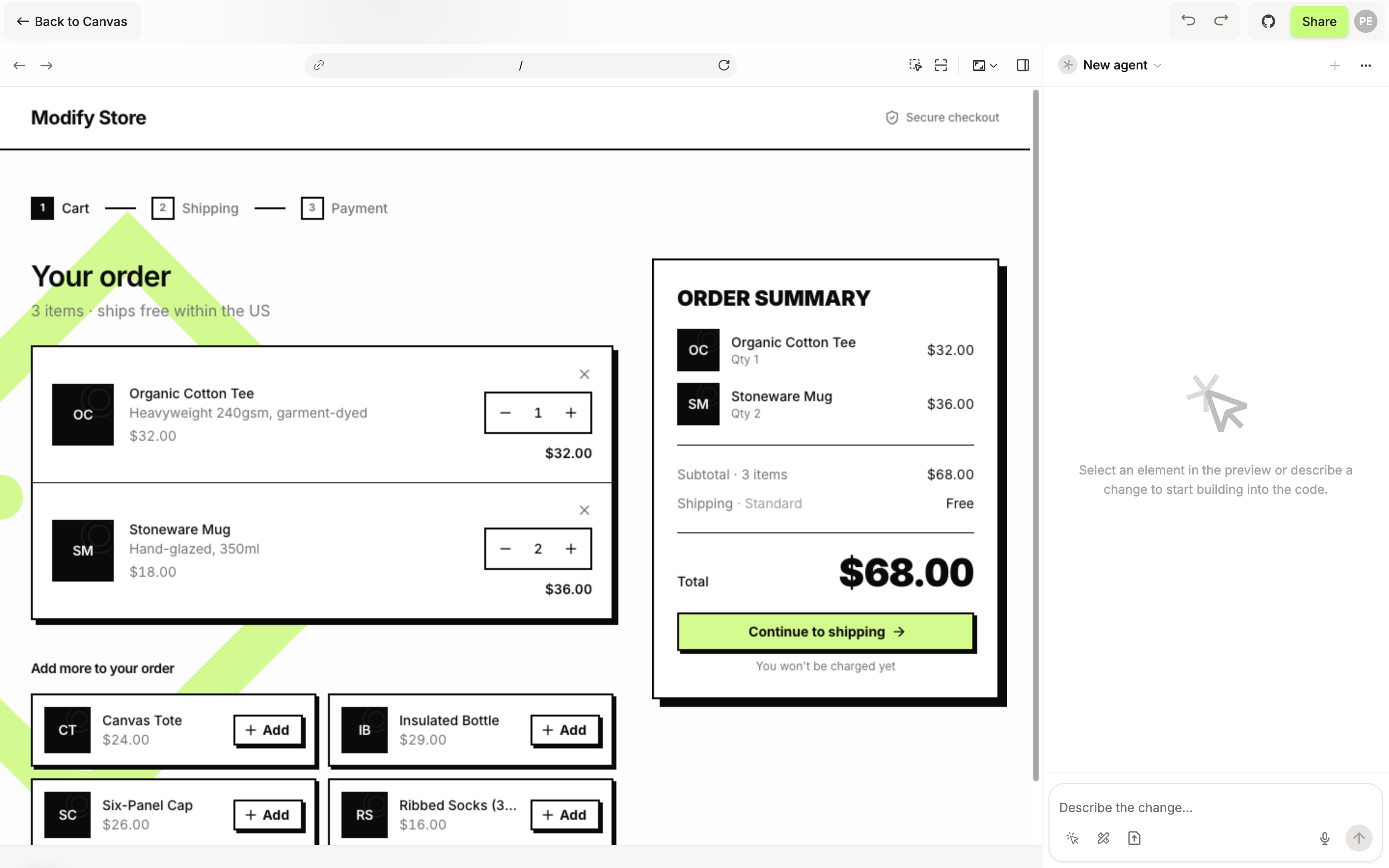
Build Mode is where a design becomes code. A coding agent changes the real files of your codebase, and the result runs live on a stage next to the chat.
How it fits
Modeinspect has two modes. On the canvas you explore: the agent card on a frame says Explore, the canvas agent proposes directions, and your codebase stays untouched. In Build Mode the coding agent writes the change into the code and the stage shows it running in your product.
You arrive from the canvas with something in hand: a Portal you want to work in, or a frame you explored and now want built. The chat opens empty and asks you to select an element in the preview or describe a change. Either one starts the agent.
The stage is your app in a browser: Back, Forward, Reload, and an address bar. Click through it as a user would to reach the page you want to change. See Open Build Mode and move around your app.
The stage shows the page at one width at a time, from Mobile to Large desktop, picked above the stage. See Preview your app at different screen sizes.
Back to Canvas at the top left takes you back. Turning the agent's change into a pull request is its own step, covered in a later article.
What it does not do
Build Mode does not edit frames on the canvas. To restyle a frame, go back to the canvas and edit it there.
It shows one page at one width. There is no side-by-side view of screen sizes inside Build Mode: put one Portal per width on the canvas instead.
It runs the codebase the canvas belongs to, on the canvas's branch. It cannot open another codebase.