
A duplicate is a new canvas with the same content, on a branch of its own. Make one to try a second direction without touching the original, or to keep working after the canvas's pull request was merged.
Steps
Open the canvas and click the three-dot button next to its name.
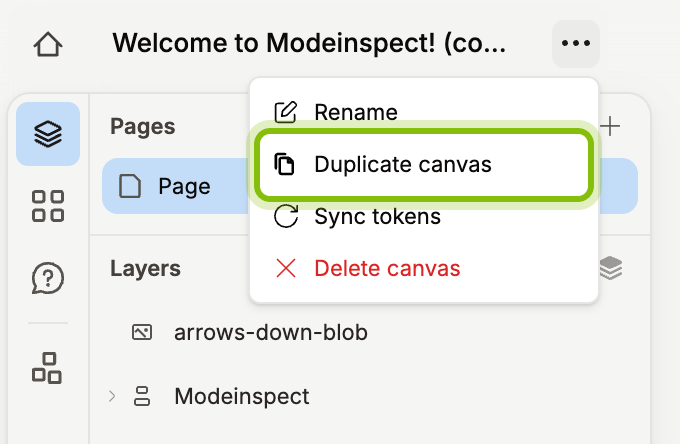
Click Duplicate canvas. A Duplicating canvas message appears while the copy is made.
When it changes to Canvas created, click Open. The copy opens, named after the original with (copy) after its name.
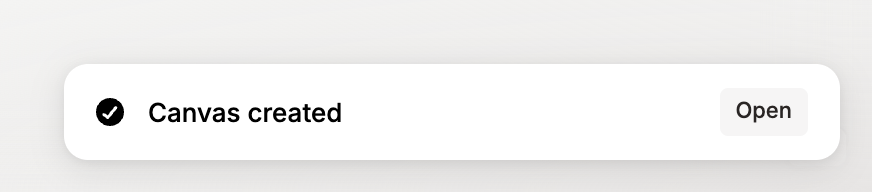
If you do not click Open, you stay where you are. The copy is listed next to the original on Home and on the codebase page.
Other places to duplicate from
Every canvas card on Home, My work, Drafts, and the codebase page has Duplicate canvas in its menu. Click the three-dot button on the card, or right-click the card, see Rename, duplicate and delete canvases.
When the canvas's pull request has been merged, the GitHub button in the canvas header opens a popover that says Merged and offers Duplicate canvas. The merged canvas stays as it is, and the copy is where you keep working.
What the copy keeps
The copy has every page and everything on it: frames, layers, Portals, and captures. Code changes made in the original that are not synced yet come along as the copy's own changes, so its Portal shows the same state of your app. A canvas started from a branch stays on that branch, see Start a canvas from a branch or pull request.
The copy has no pull request. When you sync it, it gets a branch and a pull request of its own. Agent conversations stay with the original.
If it does not work
Duplicated without code changes: the copy has every page, but the original's unsynced code changes could not be read because the environment the original ran in is gone.
Couldn't duplicate: the branch this canvas was imported from could not be found: the branch was deleted in the repository. The original still opens.
Couldn't duplicate: this codebase's sandbox isn't ready yet: the codebase finished setup a moment ago. Try again in a few minutes.
Couldn't duplicate this canvas. Try again.: the copy could not be made and nothing was created.